Best frames
10.1-inch Frameo frame · 16GB · A-120

Chnwpify 10.1-inch Frameo Frame

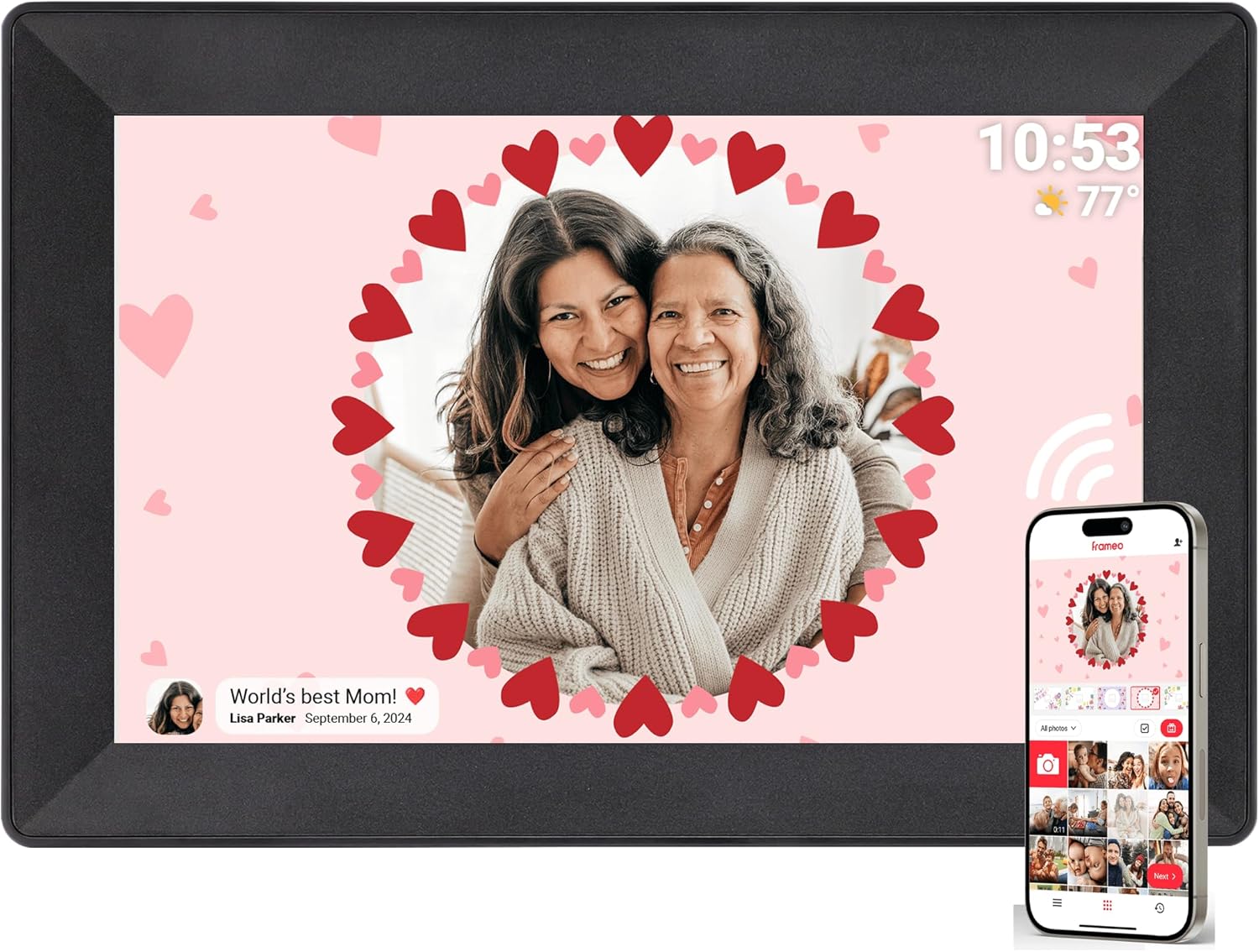
A plain black 10.1-inch Frameo frame that tells the story behind each picture: captions sit in the corner of the screen, photos turn to fit the frame, and longer videos play from a memory card.

  • Screen10.1-inch touch, 1280x800
  • Storage16GB built in
  • CaptionsShown in the lower-left corner
  • PlacementStand for the desk, or on the wall
  • AppFrameo, free for iPhone and Android
  • Warranty365-day replacement service
Lovely for a home with
  • Families who like to add a line of story to each photo
  • A modest photo collection: 16GB rather than 32GB
  • Long birthday videos played from a memory card
  • A grandparent who needs a simple touch screen and nothing else
Think twice if
  • Years of photos from a large family: a 32GB frame gives more room
  • Anyone who wants a synced calendar on screen
See this frame

The story line under each photo on the Chnwpify A-120

Chnwpify's 10.1-inch frame is a straightforward black Frameo frame with one habit families grow fond of: captions. Whoever sends a picture can add a line of text, and the Chnwpify shows it in the screen's lower-left corner while the photo plays. A beach snapshot becomes Ella's first swim, and the blurry cake becomes Grandad's 80th.

For a grandparent, that small line does a lot of work. It answers the question that usually follows a photo on the phone, which is who, where and when, without anyone having to ring and explain.

Around the captions sits a familiar set of parts:

  • A 10.1-inch touch screen at 1280x800, the usual resolution for frames of this size.
  • 16GB of memory for photos and short videos sent through the app.
  • Auto-rotate: turn the frame on its side and the picture follows.
  • A stand for a desk or sideboard, plus the option of hanging it on a wall.

The touch screen is the only control, and Chnwpify pitches it at people who have never used a tablet. A tap pauses the slideshow, a swipe moves to the next picture, and the settings open from the same screen.

Captions are typed on the phone before sending. Add them in the Frameo app when choosing the photo, and they travel with it. A picture sent without one simply plays without text.

The model number is A-120, the frame measures about 10.5 by 7.2 inches, and the case is black plastic. Chnwpify also makes the frame in white for lighter rooms.
Frame details

Screen, storage and size

SpecValue
ModelA-120 (part number B-102K)
Screen size10.1 inches
Resolution1280x800 HD
Aspect ratio16:10
Touch screenYes, touch control
Built-in storage16GB
Memory cardCard slot; card videos have no length limit
Photo appFrameo for iOS and Android
ConnectionWi-Fi
Video from the appClips up to 15 seconds
OrientationAuto-rotate, upright or sideways
MountingDesk stand or wall hanging
CaptionsShown in the lower-left corner
SettingsSlideshow mode, play order, hide photos, brightness, sleep mode
FrameBlack plastic
Frame size10.5 x 7.2 in
PowerMains cable
Warranty365-day replacement service

Sixteen gigabytes and a memory card for the school-play video

The Chnwpify carries 16GB rather than the 32GB found in many 10.1-inch Frameo frames. For most grandparents that is still a deep well: makers of other 16GB Frameo frames rate them at 40,000 to 50,000 photos, depending on picture size. A family that sends a handful of pictures a week would take years to fill it, and old photos can be deleted on the frame when space runs low.

Video is where the memory card earns its slot. The Frameo app caps each clip at 15 seconds, which covers a wave or a giggle but not a whole nativity play. Chnwpify's answer is the card: videos copied onto a memory card and played on the frame have no length limit.

  1. Copy the full video onto a memory card from a computer.
  2. Slide the card into the frame's slot.
  3. Open it on the frame and play it from start to finish, sound included.

A card also helps as a backup. Frameo frames can copy their photos to a memory card from the settings, so a loose card in the slot doubles as a second copy of the album if the frame ever needs a reset.

Signs a 32GB frame would suit better:

  • Several grandchildren, each with parents sending daily.
  • A habit of sending videos rather than photos.
  • A plan to preload a decade of scanned albums.

Hiding is different from deleting. A hidden photo stays in the memory but drops out of the slideshow, which suits the picture nobody likes of themselves; deleting frees the space. The help on deleting pictures covers both.

The memory card help explains how many pictures fit in 16, 32 and 64GB and how to format a card on Windows or Mac.

Among the frames

Where it sits by screen size

Frameo frame models by screen size, September 2026. Highlighted: Chnwpify 10.1-inch Frameo Frame.

Setting up the Chnwpify for a grandparent who never uses apps

The person receiving a Chnwpify never needs the app at all. The work happens once, on the day it comes out of the box, and after that photos arrive from relatives' phones while the grandparent simply watches. Frameo is a Danish photo-sharing service, and its app is free on the App Store and Google Play.

A first afternoon with the frame usually runs like this:

  1. Plug it in, choose the language and join the home Wi-Fi.
  2. Give the frame a name, such as Grandma's lounge, so senders know where the photo is going.
  3. Tap to show a friend code, and type it into the Frameo app on each relative's phone.
  4. Send a first photo with a caption to check that everything works.

Privacy is built into that code. Only people who have been added can send pictures, and Chnwpify notes that the frame's connection code updates automatically, so an old code written on a fridge note cannot be reused by a stranger.

New relatives can join at any time. A cousin abroad or a new daughter-in-law only needs a fresh code from the frame, which takes a minute on the touch screen.

Chnwpify lets the owner adjust a short list of settings on the screen. The slideshow mode and playback order can change, individual photos can be hidden without deleting them, and brightness and a sleep schedule keep the frame from glowing at midnight.

If the frame will not connect, the router's band is the usual suspect. Router troubleshooting for Frameo explains the 2.4GHz setting, and the setup guide for Grandma's frame covers each step with more detail.

Also lovely

Three frames worth a look

Twice the memory and a calendar1 Akimart 10.1-inch Frameo Frame
Akimart 10.1-inch Frameo Frame
Akimart's 10.1-inch frame doubles the storage to 32GB and syncs iCloud, Google, Outlook and Yahoo calendars beside the photos.
  • 10.1" touch screen · 32GB
  • Photos arrive from the Frameo app
  • 1280×800 IPS display
See this frame
Another 16GB frame in a gift box2 Ciowain 10.1-inch Frameo Frame
Ciowain 10.1-inch Frameo Frame
Ciowain's 10.1-inch frame pairs 16GB with a microSD slot up to 32GB and arrives in a gift box with an adjustable stand.
  • 10.1" touch screen · 16GB
  • Photos arrive from the Frameo app
  • 1280×800 IPS display
See this frame
A warmer wooden look3 TAPINSAW 10.1-inch Frameo Frame
TAPINSAW 10.1-inch Frameo Frame
TAPINSAW's 16GB frame uses a wooden frame design that sits well beside printed family photos.
  • 10.1" touch screen · 16GB
  • Photos arrive from the Frameo app
  • 1280×800 IPS display
See this frame

Chnwpify, Ciowain or a 32GB Akimart: choosing the gift

Several 10.1-inch Frameo frames sit near the Chnwpify, and they differ in memory, calendar support and how photos get in without a phone. The Chnwpify's strengths are its captions, its full-length card videos and its simple black case. Its limits are the smaller 16GB memory and no mention of a calendar view.

FrameStorageExtra routeStandout
Chnwpify A-12016GBMemory cardCaptions, full-length card video
Ciowain 10.1-inch16GBmicroSD up to 32GBGift box, adjustable stand
Akimart 10.1-inch32GBCard slotCalendar with four services, detachable stand
TAPINSAW 10.1-inch16GBmicroSD up to 32GBWooden frame design

Choose the Chnwpify for a grandparent who loves the stories behind pictures and a family that sends a steady trickle rather than a flood. Choose the Akimart for twice the memory and a calendar beside the photos.

On paper the Ciowain comes nearest: the same 16GB, a microSD slot and a gift box, but without Chnwpify's promise of full-length card video. TAPINSAW trades the black case for a wooden frame design that sits more quietly among printed photos on a mantelpiece.

Before wrapping, check three things:

  • A socket close to the shelf, since the frame runs on its cable.
  • The Wi-Fi password, written down for the day it is opened.
  • A few captioned photos already sent, so the first slideshow tells a story.

For the wider field, every 10.1-inch Frameo frame compared covers 16GB and 32GB models alike.

Family questions

Before you wrap it

How do captions work on the Chnwpify frame?

Type the caption in the Frameo app when sending the photo. The frame shows it in the lower-left corner while that picture plays.

Can the Chnwpify play videos longer than 15 seconds?

Yes, from a memory card. Clips sent through the Frameo app stop at 15 seconds, but videos copied onto a card and played on the frame have no length limit.

Is 16GB enough for a Chnwpify frame?

For most grandparents, yes. Makers of 16GB Frameo frames rate them at tens of thousands of photos, though a family that sends many videos fills it faster.

Can the Chnwpify hang on a wall?

Yes. It comes with a stand for a desk and can also hang on a wall, and photos rotate to match upright or sideways placement.