Best frames
10.1-inch Frameo frame · 32GB · ZN-DP1002

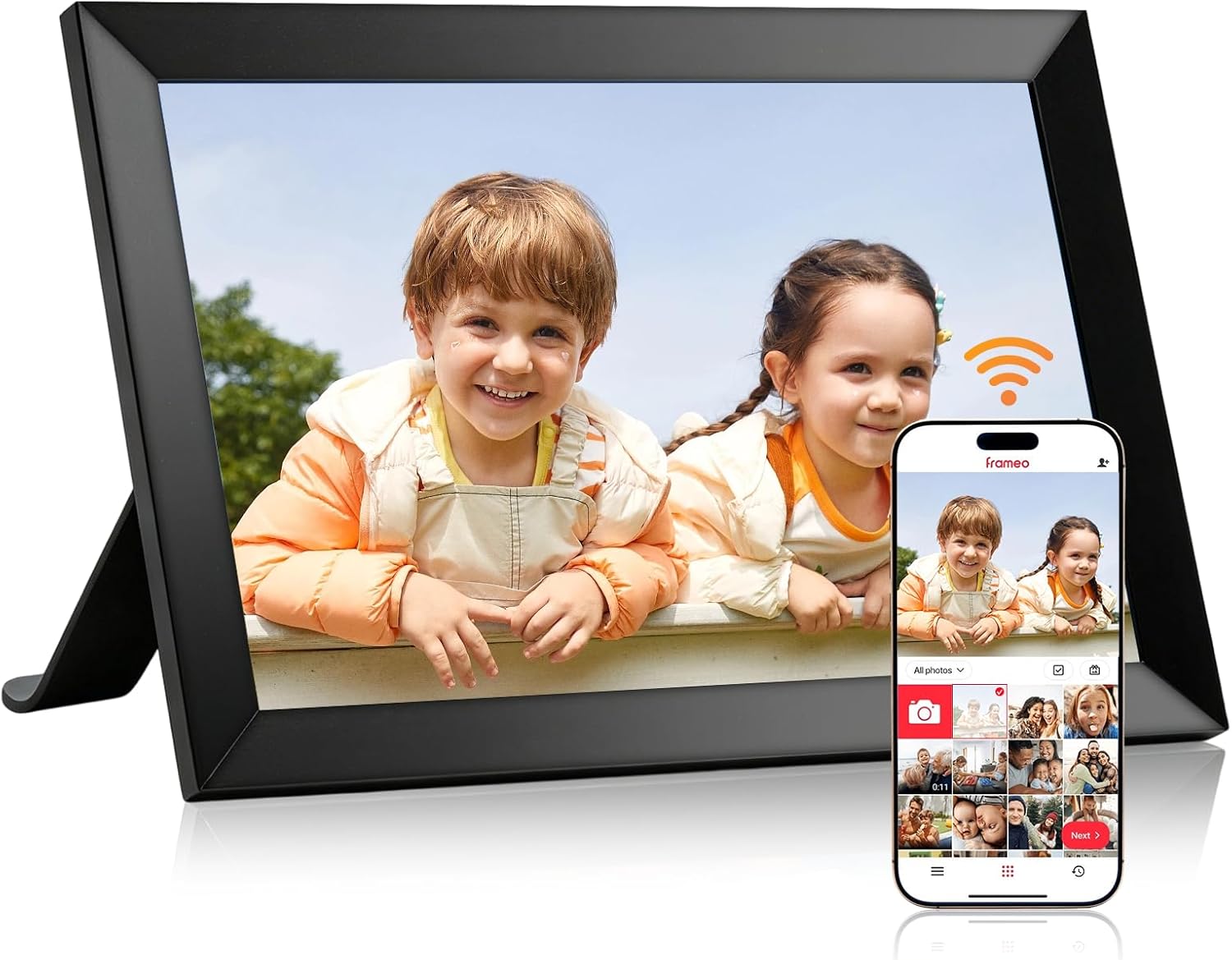
Dxmart 10.1-inch Frameo Frame

A plain black 10.1-inch Frameo frame that does the basics well: a 1280x800 IPS touch screen, 32GB for roughly 40,000 photos, auto-rotate and a mount for the wall.

  • Screen10.1-inch IPS touch, 1280x800
  • Storage32GB, about 40,000 photos
  • Memory cardmicroSD up to 32GB
  • MountingWall mount or tabletop
  • WeightAbout 0.6 kg
  • ModelZN-DP1002
Lovely for a home with
  • A hallway or landing wall where photos greet every visitor
  • A grandparent who wants a slideshow and nothing more
  • Families who like to zoom photos to fill the screen
  • 32GB of room without paying for extras
Think twice if
  • A family calendar on screen: other frames sync one
  • Loading photos without any app: the card is the only other route
See this frame

The Dxmart ZN-DP1002 on Dad's desk, plain and black

Dxmart's 10.1-inch Frameo frame is the kind that disappears into a room and leaves only the photos. The case is plain black plastic, there are no mirror panels or wood effects, and the 1280x800 IPS screen does all the talking. For a father who likes things simple, or a study where anything flashy would jar, that restraint suits.

The model is the ZN-DP1002, and it weighs about 0.6 kilograms. Its specification covers what a first frame needs:

  • A 10.1-inch IPS touch screen in a 16:10 shape with a 178-degree viewing angle.
  • 32GB of built-in memory, which Dxmart puts at about 40,000 pictures.
  • A microSD slot for cards up to 32GB, sold separately.
  • Auto-rotate, so the photos follow the frame when it is turned.
  • A wall mount, with the tabletop as the other option.

Dxmart describes the interface as easy for every age, and the setup as a few simple steps on the touch screen. That fits the Frameo pattern: once the frame is on the Wi-Fi and the family has added it with a code, the person who owns it only watches.

The memory card is not in the box. If the plan is to preload photos on a card, buy a 32GB microSD card alongside the frame and format it as FAT32 before copying anything.

A desk is a good first home for it. Seen from a chair at arm's length, a 10.1-inch screen at 1280x800 shows faces clearly, and the frame fits beside a laptop without crowding it.

Frame details

Screen, storage and size

SpecValue
ModelDxmart ZN-DP1002
Screen size10.1 inches
PanelIPS LCD touch screen, 178° viewing angle
Resolution1280x800
Aspect ratio16:10
Built-in storage32GB, about 40,000 pictures
Memory cardmicroSD up to 32GB, not included
Photo appFrameo for iOS and Android
ConnectionWi-Fi
Video from the appClips up to 15 seconds
OrientationAuto-rotate, upright or sideways
MountingWall mount or tabletop
SettingsSlideshow, video playback, sleep mode, zoom, brightness, full screen
Auto on/offYes
ColourBlack
FramePlastic
Weight0.6 kg
PowerMains cable
Warranty1 year

A full-screen slideshow and a zoom for Grandma's favourite faces

Where the Dxmart earns its keep is in the small settings that make each photo look right. Pictures can be zoomed so faces fill the screen, shown full screen without borders, and played in a slideshow at the pace the owner likes. Video plays too, and sleep mode turns the screen off at night.

A phone photo and a 10.1-inch frame rarely share the same shape, so these controls matter:

SettingWhat it does for the family
ZoomCrops in on the faces in a wide group shot
Full screenFills the frame edge to edge, no black bars
SlideshowSets how long each photo stays up
BrightnessSofter for a bedroom, brighter for a sunny room
Sleep mode and auto on/offDark at night, awake by breakfast

Full screen suits most portraits and holiday snaps, but it trims the edges of a very wide picture. For a panorama or a long group photo, turn full screen off for that one image so nobody at the end of the row disappears.

Several people can send to the same frame, and Dxmart points out that the interface works for multiple users. In practice that means:

  1. Each relative installs the free Frameo app.
  2. Each one enters a friend code shown on the frame.
  3. Photos from all of them mix into one slideshow.

Clips from the app stop at 15 seconds. Longer videos can play from the microSD card instead.

The guide to adding photos walks through the friend code, and the help on deleting pictures covers tidying the album later.

Among the frames

Where it sits by screen size

Frameo frame models by screen size, September 2026. Highlighted: Dxmart 10.1-inch Frameo Frame.

Hanging the Dxmart on the hallway wall

A Frameo frame on the wall of a hallway or landing becomes part of the house: the first thing a visitor sees, and something the family passes a dozen times a day. The Dxmart is built for this, with a wall mount and auto-rotate so it can hang either way up. At about 0.6 kilograms, it asks little of the wall.

A few steps make the job tidy:

  1. Pick a spot at eye height, close to a socket, since the frame runs from the mains.
  2. Decide upright or sideways first. Upright suits a narrow wall beside a door; sideways suits the space above a console table.
  3. Fix a screw or hook that suits the wall, plasterboard or brick.
  4. Run the cable straight down to the socket and hold it with a couple of clips.

Once it hangs, auto-rotate turns every photo to match. A portrait of a grandchild fills an upright frame, and the frame still makes the best of sideways group shots.

Things to check before drilling:

  • Wi-Fi reach. Hallways are often far from the router. Test the frame on the chosen spot before fixing it.
  • Sunlight. A window opposite can wash out any screen, so a shaded wall shows photos better.
  • Reach. The screen is the only control, so keep it low enough for the owner to tap.

If the frame loses the network once it hangs, Frameo Wi-Fi troubleshooting covers weak signal and the 2.4GHz setting. A frame that stays completely dark is covered in the help for a frame that will not turn on.

Also lovely

Three frames worth a look

Support that reaches the recipient1 BIGASUO 10.1-inch Frameo Frame
BIGASUO 10.1-inch Frameo Frame
BIGASUO's 10.1-inch frame has 32GB and a microSD slot, and its warranty support extends to whoever received it as a gift.
  • 10.1" touch screen · 32GB
  • Photos arrive from the Frameo app
  • 1280×800 IPS display
See this frame
A calendar on the frame2 YENOCK 10.1-inch Frameo Frame
YENOCK 10.1-inch Frameo Frame
YENOCK's 10.1-inch frame pairs 32GB with a calendar function, captions and lifetime support.
  • 10.1" touch screen · 32GB
  • Photos arrive from the Frameo app
  • 1280×800 IPS display
See this frame
A magnetic stand3 LeaMea 10.1-inch Frameo Frame
LeaMea 10.1-inch Frameo Frame
LeaMea's 10.1-inch frame has 32GB and a magnetic stand that switches between upright and sideways, plus wall mounting.
  • 10.1" touch screen · 32GB
  • Photos arrive from the Frameo app
  • 1280×800 IPS display
See this frame

Dxmart next to BIGASUO, YENOCK and LeaMea: plain 32GB frames

The Dxmart belongs to a group of 10.1-inch Frameo frames that share the same screen and 32GB and differ in the details around them. BIGASUO adds a warranty that covers the person who received the frame as a gift. YENOCK adds a calendar function, and LeaMea a magnetic stand.

FrameStorageCardStandout
Dxmart ZN-DP100232GBmicroSD to 32GBZoom, full screen, wall mount
BIGASUO 10.1-inch32GBmicroSDWarranty support for gift recipients
YENOCK 10.1-inch32GB—Calendar function, lifetime support
LeaMea 10.1-inch32GB—Magnetic stand, wall mounting

Choose the Dxmart when the frame will hang on a wall and the owner wants photos and little else. Its zoom and full-screen settings make the most of the 10.1-inch screen, and the 32GB gives room for years.

BIGASUO makes most sense when the gift goes to another household. Its one-year warranty and support reach the person who received it, so a grandparent can call for help directly.

YENOCK suits a household that runs on appointments, since its calendar function puts the week's plans beside the photos, and captions tell the story of each picture. LeaMea's magnetic stand makes turning the frame from upright to sideways a one-handed job, handy on a sideboard where the frame is moved often. With the same 1280x800 screen in all four, picture quality is a tie. The decision is about where the frame lives and who looks after it.

Before the frame leaves home:

  • Buy and format a microSD card if photos will be preloaded.
  • Choose the wall, and test the Wi-Fi there.
  • Send the first few photos yourself, so the frame arrives full.

A wider comparison of 10.1-inch frames sets the Dxmart against the rest.

Family questions

Before you wrap it

Is a memory card in the Dxmart box?

No. Its slot reads microSD cards as large as 32GB, bought separately. Format it as FAT32 before use.

How many photos does the Dxmart hold?

Dxmart puts the 32GB memory at about 40,000 pictures. Videos take more space, so the real number depends on the mix.

Can the Dxmart frame hang on a wall?

Yes. It has a wall mount and auto-rotate, so it can hang upright or sideways and the photos turn to match.

Does the Dxmart turn off at night?

Yes. Sleep mode and auto on/off let the screen go dark overnight and come back on in the morning.