Best frames
15.6-inch Frameo frame · White · 32GB

Moonka 15.6-inch Frameo Frame

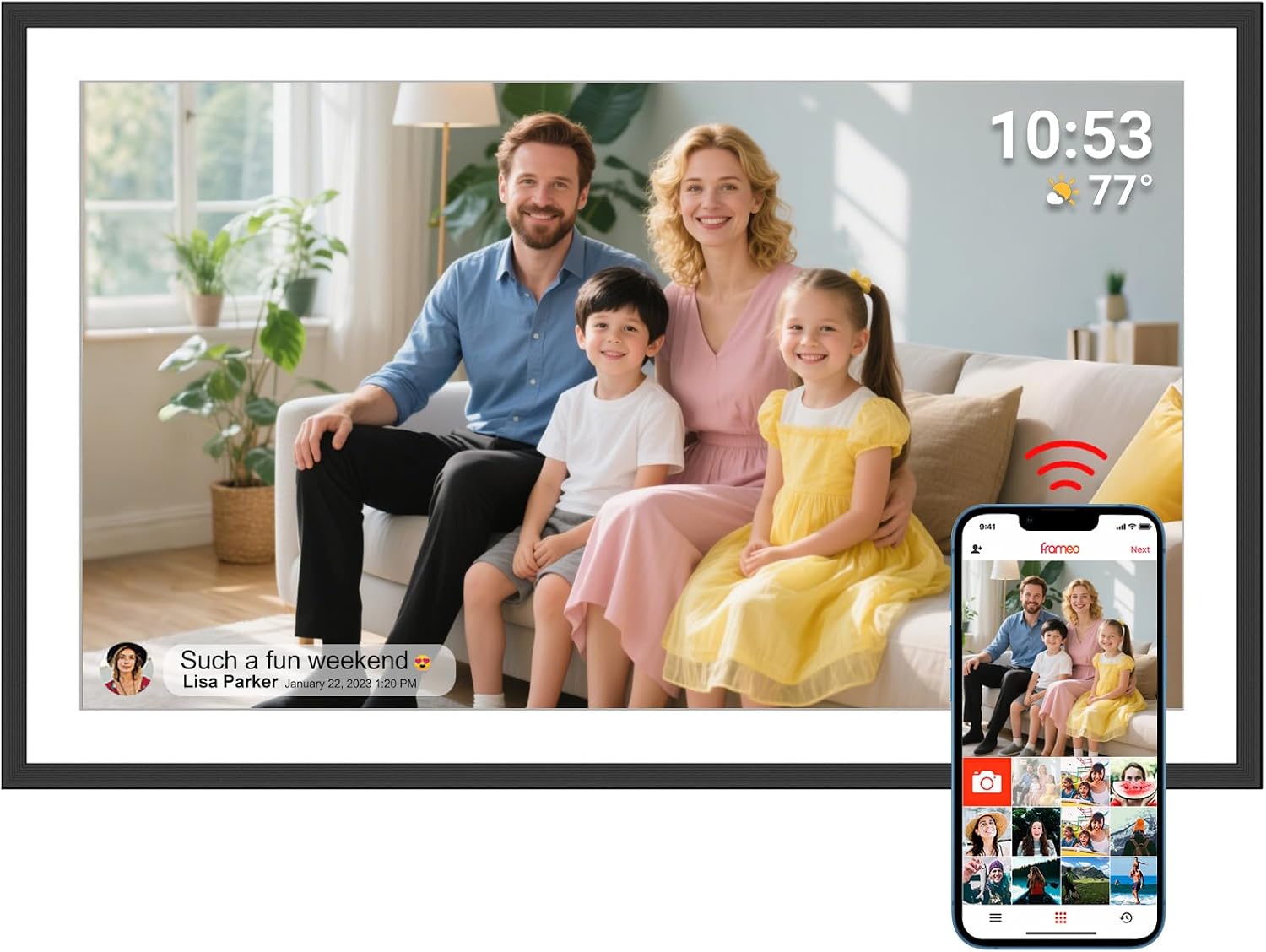
A bright white 15.6-inch Frameo frame from Moonka, with a 1920x1080 IPS touch screen, 32GB of memory and the family calendar sharing the screen with the latest photos.

  • Screen15.6-inch IPS touch, 1920x1080
  • Viewing angle178 degrees
  • Storage32GB built in
  • Wi-Fi2.4GHz
  • FinishWhite
  • Warranty1 year plus online support
Lovely for a home with
  • A light kitchen or a white shelf where a black frame would look heavy
  • A family that wants appointments and photos on one screen
  • Grandparents whose Wi-Fi drops now and then, since stored photos keep playing
Think twice if
  • A home whose router only broadcasts 5GHz
  • Loading an old photo archive from a card or USB stick
See this frame

A white Moonka 15.6-inch frame on Grandma's kitchen dresser

Moonka dresses its 15.6-inch Frameo frame in white, which is the first thing most families notice. On a pale dresser, a cream kitchen wall or a white bookcase, the frame blends into the room rather than a black screen someone forgot to switch off.

Inside that white border sits a 15.6-inch IPS touch screen at 1920 by 1080 pixels. IPS panels keep their colours when seen from the side, and Moonka quotes a 178-degree viewing angle, so the grandchildren still look like themselves to whoever is stirring the soup at the stove.

The main parts of the frame, in short:

  • Full HD at 15.6 inches, about 141 pixels per inch, sharp from across a kitchen table.
  • 32GB of memory, room for thousands of photos before a clear-out.
  • Auto-rotate, so upright portraits turn to match the frame.
  • A calendar view, newly added, that shows upcoming plans alongside the pictures.
  • Greetings, themed cards a relative can send for a birthday or a holiday.

Moonka is a long-standing maker of digital frames and electronics, and it builds this frame in three sizes. The 10.1-inch model comes in black for a bedside, and the 21.5-inch model has a brown wooden border for a living-room wall. The white 15.6-inch sits between them, big enough to share, small enough for a counter.

A frame that suits the room. White frames show a little less contrast at the edges than black ones, which many people find calmer in a bright kitchen. In a dark lounge, a black or wooden border may blend in better.
Frame details

Screen, storage and size

SpecValue
Screen15.6-inch IPS touch screen
Resolution1920x1080 Full HD
Aspect ratio16:9
Viewing angle178 degrees
Built-in storage32GB
Photo appFrameo for iOS and Android, free
Wi-Fi2.4GHz only
Video from the appClips up to 15 seconds
Offline useStored photos play without Wi-Fi
OrientationAuto-rotate
CalendarCalendar view beside the photos
GreetingsThemed greetings sent from the app
SettingsSlideshow, hide photos, brightness, sleep timer
ColourWhite
PowerMains adapter
Warranty1 year, with online support

The dentist, the recital and new photos on one Moonka screen

The calendar is the feature that makes this Moonka frame more than a slideshow. Link a calendar through the Frameo app, and upcoming events appear on the screen next to the photos, so the family diary and the family album share the same spot on the wall.

A morning with the frame could look like this:

  1. Grandma makes tea and sees that Thursday is the grandson's school concert.
  2. Overnight, her daughter sent six photos from the weekend, and they are already in the slideshow.
  3. She taps one to pause it and sends a heart back, which shows up on her daughter's phone.
  4. In the afternoon a greeting arrives for her birthday, a themed card with a message from the whole family.

Everything reaches the frame through the free Frameo app. Each sender puts it on their own iPhone or Android, types the code the frame shows once, and can then send photos and videos of up to 15 seconds from anywhere. There are no email addresses, no cloud accounts and no monthly fees for the basic service.

Phones without an invitation cannot send anything. That keeps strangers and adverts off the screen, and it means the owner decides who joins. The optional Frameo+ plan adds extras such as longer videos, but the frame works fully without it.

The calendar suits a home in which one person keeps the diary for everyone. A daughter who books Grandad's appointments can add them to a shared calendar at her desk, and they appear on the frame at his end without a phone call. Grandad sees the plan every time he glances at the photos, which is a gentler reminder than a note on the fridge.

For more on who can send and how, the guide to adding photos explains friend codes and the QR code.

Among the frames

Where it sits by screen size

Frameo frame models by screen size, September 2026. Highlighted: Moonka 15.6-inch Frameo Frame.

Getting the Moonka 15.6 onto Grandad's 2.4GHz Wi-Fi

Moonka is clear that this frame connects on 2.4GHz alone. Most home routers broadcast a 2.4GHz network alongside a faster 5GHz one, so this rarely stops anyone, but it is worth checking before the frame is wrapped.

Run through these checks at their house, or ask over the phone:

  • Look at the router label or the Wi-Fi list on a phone. Two network names, one ending in 5G, usually means both bands are on.
  • If there is only one name, the router may combine both bands. The frame normally still finds the 2.4GHz half.
  • A mesh system or a new fibre router sometimes hides 2.4GHz. The broadband provider's app can switch it back on.
  • Keep the password written down for the day you hand the frame over.

Once connected, the frame is happy to go offline for a while. Moonka points out that photos stored in its 32GB keep playing without Wi-Fi, which matters for a holiday cottage or a home where the router gets unplugged to save power. New photos simply queue and arrive when the connection returns.

The sleep timer switches the screen off at night and back on in the morning, and brightness is adjustable for a dim hallway. Both settings sit in the Frameo menu on the touch screen, so there is no remote.

Before the birthday. Set the frame up on your own Wi-Fi, send twenty photos, then change the network at their home. It opens full of pictures instead of a welcome screen.

If it refuses to connect, the Wi-Fi troubleshooting guide goes through the fixes in order.

Also lovely

Three frames worth a look

A bigger wall, any router1 Moonka 21.5-inch Frameo Frame
Moonka 21.5-inch Frameo Frame
Moonka's 21.5-inch frame adds a brown wooden border and joins 2.4GHz, 5GHz and Wi-Fi 6 networks.
  • 21.5" touch screen · 32GB
  • Photos arrive from the Frameo app
  • 1920×1080 IPS display
See this frame
Another white 15.6-inch2 PiPivision 15.6-inch Frameo Frame
PiPivision 15.6-inch Frameo Frame
PiPivision's white 15.6-inch Full HD frame adds a microSD slot for viewing extra photos straight from a card.
  • 15.6" touch screen · 32GB
  • Photos arrive from the Frameo app
  • 1920×1080 IPS display
See this frame
More memory and sound3 BIGASUO 15.6-inch Frameo Frame
BIGASUO 15.6-inch Frameo Frame
BIGASUO's 15.6-inch frame carries 64GB, reads SD cards and USB sticks and plays video through a built-in speaker.
  • 15.6" touch screen · 64GB
  • Photos arrive from the Frameo app
  • 1920×1080 IPS display
See this frame

Moonka 15.6, the 21.5-inch wooden model or a bigger memory

The white 15.6-inch frame covers most homes, but two nearby choices suit particular families. Moonka's own 21.5-inch model and BIGASUO's 15.6-inch frame each trade something for something else.

FrameScreenWi-FiSuits
Moonka 15.6-inch1920x1080, white2.4GHzKitchens and light rooms
Moonka 21.5-inch1920x1080, brown wood2.4GHz, 5GHz and Wi-Fi 6A living-room wall
BIGASUO 15.6-inch1920x1080, black2.4GHz64GB and video with sound

The 21.5-inch Moonka is the one to choose when the router is 5GHz only, or when the frame will hang above a fireplace and be seen from across the room. The white 15.6 wins when the frame stands on a counter or dresser and has to look light.

BIGASUO's frame is the pick for a family with videos to share. Its 64GB holds twice as much, and its built-in speaker plays clips with sound from a USB stick, including ones far longer than the app's 15-second limit. The Moonka answers with a calendar and a white finish instead, which many kitchens will value more than extra memory.

Moonka's 10.1-inch frame is the third member of the family, in black, for a nightstand or a desk. Sending to two frames at once is easy in the Frameo app, so a pair works well for grandparents who spend evenings in one room and mornings in another.

Before you buy, check these points:

  1. The router band. The 15.6-inch frame needs 2.4GHz.
  2. A socket nearby. It runs on its mains adapter all day.
  3. The room colour. White suits light rooms best.
  4. The photo archive. Moonka does not describe a card slot or USB port on this model, so plan on sending photos from phones.

The Frameo size guide shows how 10.1, 15.6 and 21.5 inches compare on a real shelf.
Family questions

Before you wrap it

Does the Moonka 15.6-inch frame work with 5GHz Wi-Fi?

No. Moonka states it uses the 2.4GHz band alone. Most routers offer a 2.4GHz network alongside 5GHz, so it connects in most homes.

Can the Moonka frame show photos without Wi-Fi?

Yes. Photos stored in its 32GB keep playing without a connection. New photos arrive once it reconnects.

Does it show a calendar?

Yes. Moonka added a calendar feature, so upcoming events can appear on the frame alongside the photos.

Are there fees to send photos?

No. The Frameo app is free for every sender. Frameo+ is an optional paid plan for extras.

What colour is the Moonka 15.6-inch frame?

White. Moonka's 21.5-inch model comes in brown wood and its 10.1-inch model in black.