Best frames
15.6-inch Frameo frame · 7-inch date clock · M15R2

FLYRUIT 15.6-inch Frameo Frame with Clock

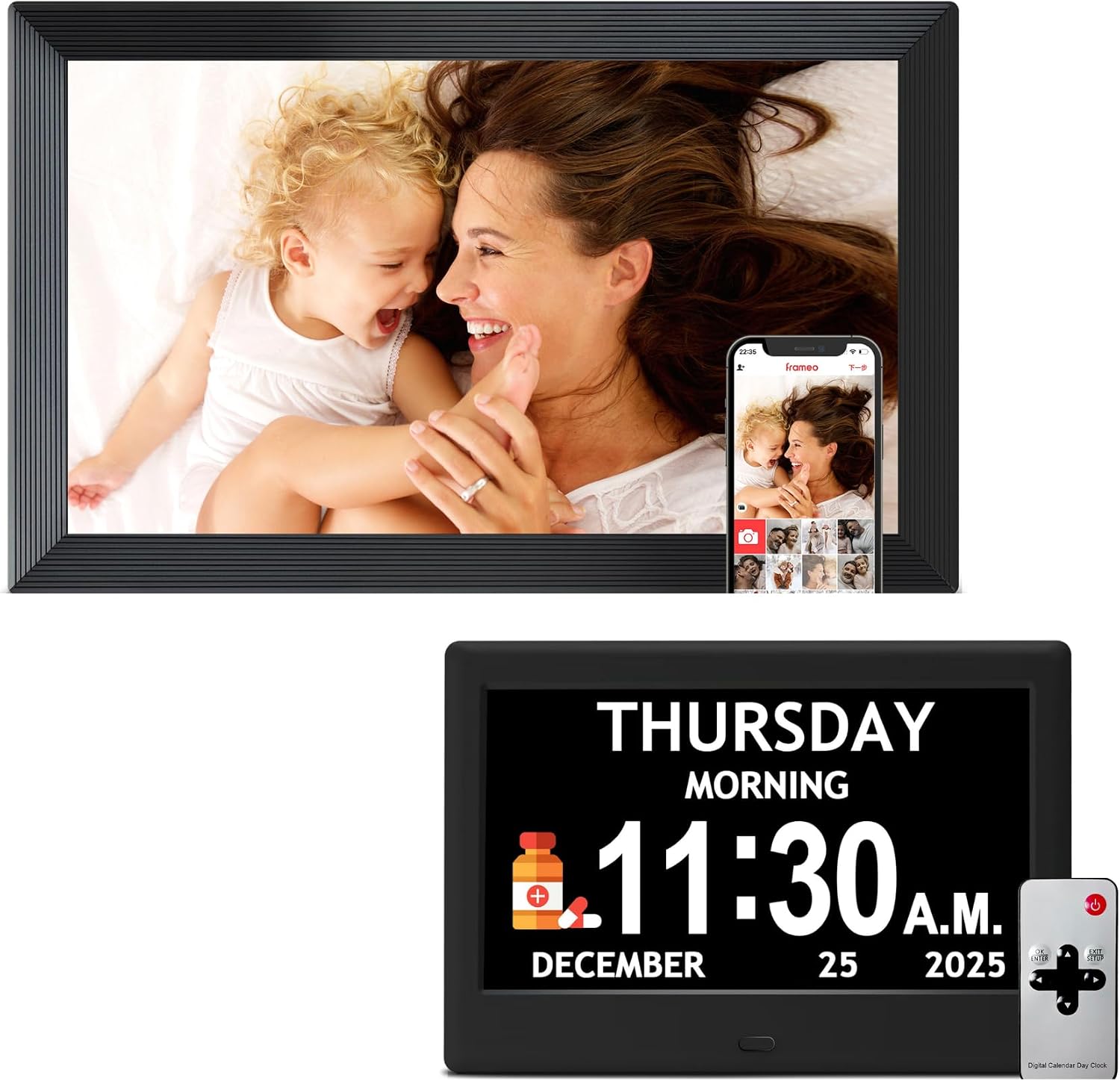
A two-piece gift for an older parent from FLYRUIT: a 15.6-inch Frameo photo frame that fills with family pictures, and a 7-inch digital clock that shows the date and the time.

  • Set15.6-inch Frameo frame + 7-inch clock
  • Photo appFrameo, free for iPhone and Android
  • ClockDate and time
  • ConnectionWi-Fi
  • ModelM15R2
Lovely for a home with
  • An older parent who likes to see the date and time at a glance
  • Families who want to send photos and help with the daily routine in one gift
  • A living room or kitchen with space for two screens
Think twice if
  • Anyone who wants published figures for resolution and memory before buying
  • A single small shelf: this is two devices
See this frame

A photo frame and a date clock for Mum in one FLYRUIT box

FLYRUIT's M15R2 set answers two wishes families often have for an older parent. The 15.6-inch Frameo frame keeps the grandchildren's latest photos in view, and the 7-inch digital clock beside it shows the date and the time on its own 7-inch screen.

The two pieces do different jobs:

  • The 15.6-inch Frameo frame receives photos and short videos from the family's phones through the free Frameo app, wherever the senders live.
  • The 7-inch digital clock shows the date and time, a steady reference point for the day.

FLYRUIT names older relatives as the people this set is for, and the pairing makes sense. A large, bright photo frame gives a daily reason to smile at the family, and a clear date display helps anyone who has started losing track of which day it is, after retirement, a hospital stay or simply a quiet week at home.

The frame runs the same Frameo software as dozens of other frames. Relatives install the app, pair once with a code, and from then on their photos appear on the screen within moments of being sent. Phones without a code have no way to post, so nothing arrives from strangers.

What FLYRUIT publishes, and what it leaves out. The set is described by its screen sizes, the Frameo app, Wi-Fi and the date-and-time clock. FLYRUIT does not list the frame's resolution or memory for this set, so treat those as unknown rather than assuming the figures of its standalone 15.6-inch frame.

That makes the M15R2 a gift chosen for its purpose rather than its numbers: photos from the family on one screen, and the day and date on the other.
Frame details

Screen, storage and size

SpecValue
ModelM15R2
In the set15.6-inch Frameo photo frame and 7-inch digital clock
Photo frame screen15.6 inches
Clock screen7 inches
Clock showsDate and time
Photo appFrameo for iOS and Android
App costFree; Frameo+ optional
ConnectionWi-Fi
Video from the appClips up to 15 seconds
Who can sendInvited phones only, via a one-time code
OfflineStored photos keep playing without Wi-Fi
Designed forOlder relatives
BrandFLYRUIT

Checking the day on the 7-inch FLYRUIT clock with breakfast

The 7-inch clock is the half of the set that works without anyone doing anything. It shows the date and the time, and it sits wherever an older parent looks first thing in the morning: the kitchen table, the bedside or the shelf by the kettle.

A day with the set might run like this:

  1. At breakfast, Mum checks the clock and sees it is Wednesday, the day her son visits.
  2. On the photo frame, three pictures from last night's school play have already arrived.
  3. She taps a heart on one, and her daughter sees the reaction on her phone.
  4. At lunch a 15-second clip of the baby arrives, sent from another country.
  5. In the evening, the frame's sleep schedule dims the screen for the night.

Placing the two pieces well makes a difference. Most families put them in different spots:

  • The clock by the bed or at the breakfast table, where the day starts.
  • The photo frame in the living room, where there is space for a 15.6-inch screen and people gather.
  • Both close to a socket, since each is an electronic device that needs power.

The clock needs no app and no setup from the family's side beyond switching it on and checking that the date and time look correct. The photo frame needs the Wi-Fi and a few invitations, covered in the next section.

For a relative with more complex needs, it is worth asking their carer or doctor whether a date clock suits their routine. For most older parents, it is simply a clear, friendly reference point on the wall or table.

Among the frames

Where it sits by screen size

Frameo frame models by screen size, September 2026. Highlighted: FLYRUIT 15.6-inch Frameo Frame with Clock.

Setting up the FLYRUIT Frameo frame before the visit

The photo frame half of the set runs Frameo, and the setup is one short sequence shared by every Frameo frame. Doing it before the handover means the frame arrives full of photos instead of on a welcome screen.

Follow these steps at your home first:

  1. Plug in the frame and choose the language.
  2. Join your Wi-Fi, then give the frame a name and enter the owner's name.
  3. Install the free Frameo app on your phone and pair it with the frame's code.
  4. Send twenty or thirty favourite photos, with captions where they help.
  5. At your parent's home, change the Wi-Fi to their network.

Then invite the rest of the family. Other relatives install the Frameo app and type in a code from the frame. Keep a note of who has been added, so nobody is left out and nobody unexpected is on the list.

A few settings are worth adjusting for an older owner:

  • A sleep schedule, so the screen is dark at night and on in the morning.
  • Brightness to suit the room.
  • A slower slideshow speed, so each photo stays on screen long enough to enjoy.

Clips sent through the free app run up to 15 seconds. Frameo+ is an optional paid plan with extras such as longer videos, and the frame works fully without it. Photos already on the frame keep playing when the Wi-Fi is off.

Each screen of the first start is covered in setting up a Frameo frame, and inviting relatives in adding photos to a Frameo frame. If their router causes trouble, see the Wi-Fi guide.

Also lovely

Three frames worth a look

The frame on its own1 FLYRUIT 15.6-inch Frameo Frame
FLYRUIT 15.6-inch Frameo Frame
FLYRUIT's standalone 15.6-inch frame lists 1920x1080, 32GB and import from an SD card, a USB drive or a computer by USB-C.
  • 15.6" touch screen · 32GB
  • Photos arrive from the Frameo app
  • 1920×1080 IPS display
See this frame
Photos and calendar on one screen2 Arktronic 15.6-inch Frameo Frame
Arktronic 15.6-inch Frameo Frame
Arktronic's 15.6-inch Full HD frame syncs a calendar and shows it beside the photos, with dual-band Wi-Fi.
  • 15.6" touch screen · 32GB
  • Photos arrive from the Frameo app
  • 1920×1080 IPS display
See this frame
A 3-in-1 for the hallway3 Forc 3-in-1 Frameo Calendar Mirror
Forc 3-in-1 Frameo Calendar Mirror
Forc's 10.1-inch frame combines Frameo photos, an auto-synced calendar and a mirror finish.
  • 10.1" touch screen · 32GB
  • Photos arrive from the Frameo app
  • Clock and calendar
See this frame

The FLYRUIT set or a single frame with a calendar

The M15R2 set is one way to combine photos and the day's information. Other Frameo frames build a calendar or clock into the photo screen itself, and FLYRUIT sells its 15.6-inch frame on its own too.

ChoiceWhat it showsSuits
FLYRUIT M15R2 setPhotos on 15.6 inches, date and time on a separate 7-inch clockAn older parent who wants the date always in view
FLYRUIT 15.6-inch framePhotos, 1920x1080, 32GB, SD, USB and USB-C importA family who only needs the photo frame
Arktronic 15.6-inch framePhotos and a synced calendar on one screenA household that runs on shared appointments

The separate clock has one clear advantage: the date is always on screen, never hidden behind a photo. Frames with a calendar view share one screen between the two, which suits a busy family but can be less direct for an older parent.

The set also splits neatly across a home. The photo frame can take pride of place in the lounge, while the clock goes wherever the day begins, and neither has to compromise on size or position for the other.

Before choosing the set, run through these checks:

  1. Space. Two devices need two spots, each near a socket.
  2. Wi-Fi. The photo frame needs home Wi-Fi to receive new photos.
  3. Published details. If resolution or memory matters, the standalone FLYRUIT frame lists both.
  4. The senders. Line up the family with the app before the frame arrives.

For a single screen that mixes a mirror, a calendar and photos, Forc's 10.1-inch 3-in-1 frame is another option. The Frameo size guide compares screen sizes.

Family questions

Before you wrap it

What is in the FLYRUIT M15R2 set?

A 15.6-inch Frameo Wi-Fi photo frame and a 7-inch digital clock that shows the date and time.

Does the clock need the Frameo app?

No. The clock shows the date and time on its own. The Frameo app is for sending photos to the frame.

What resolution is the FLYRUIT frame in this set?

FLYRUIT does not publish the resolution or memory for the M15R2 set. Its standalone 15.6-inch frame lists 1920x1080 and 32GB.

Is there a subscription?

No. The Frameo app is free. Frameo+ is an optional plan for extras.